In this post, we are going to build Breakout, the classic arcade game where you control a paddle, bounce a ball, and destroy a grid of bricks. If you have been following the series from Pong and Snake, you already know the ECS basics, queries, resources, timers, and game states. Now we put it all together into a complete game with particles, lives, and a proper game over loop.
We will build the game incrementally. After every section, you can cargo run and see something new on screen. This article won’t teach you anything new, the motive of this article is to reinforce what you learnt in the previous 2 articles of this series.
Get the full source code from here.
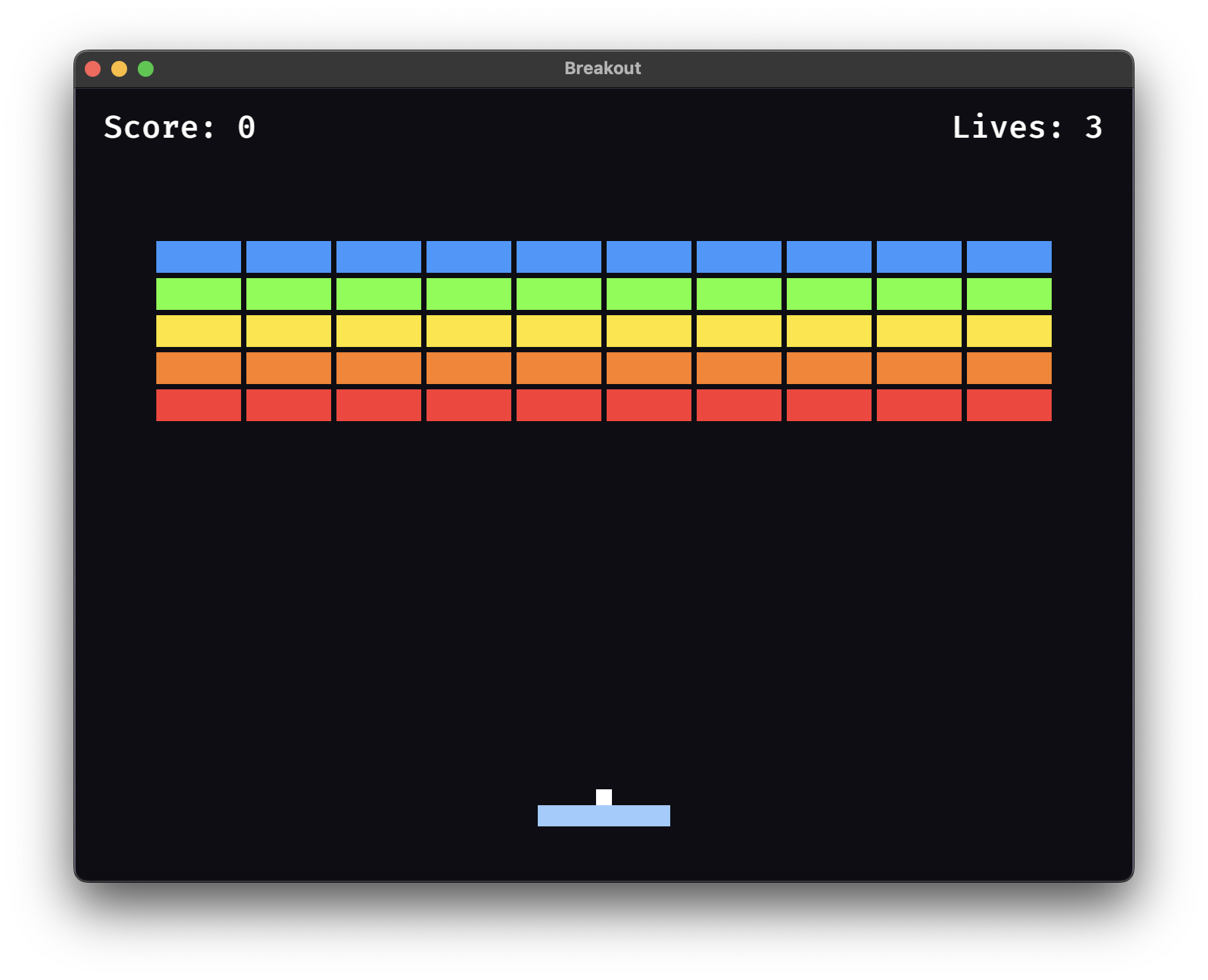
What We Are Building
If you have not played Breakout before, here is how it works. A paddle sits near the bottom of the screen. A ball bounces around the play area. Bricks are arranged in rows at the top. Your goal is to destroy all the bricks by bouncing the ball into them. If the ball falls past the paddle, you lose a life. Lose all three lives and it is game over.
We will build this using colored rectangles for everything, no sprite sheets or image files needed. The bricks will have different colors per row. The ball will leave a particle burst every time it destroys a brick. Score and lives will be displayed as text.
1. A Window on Screen
Open your terminal and create a new Rust project:
cargo new bevy_breakout
cd bevy_breakout
Open Cargo.toml and replace its contents with:
[package]
name = "bevy_breakout"
version = "0.1.0"
edition = "2024"

[dependencies]
bevy = { version = "0.18", features = ["wav"] }
rand = "0.8"
We add rand for randomizing particle directions later. The wav feature enables Bevy audio support for the future.
Now open src/main.rs and write our first version, a window with a dark background, nothing else yet:
use bevy::prelude::*;
use bevy::window::WindowResolution;

const WINDOW_WIDTH: f32 = 800.0;
const WINDOW_HEIGHT: f32 = 600.0;

fn main() {
    App::new()
        .add_plugins(DefaultPlugins.set(WindowPlugin {
            primary_window: Some(Window {
                title: "Breakout".into(),
                resolution: WindowResolution::new(WINDOW_WIDTH as u32, WINDOW_HEIGHT as u32),
                ..default()
            }),
            ..default()
        }))
        .insert_resource(ClearColor(Color::srgb(0.05, 0.05, 0.08)))
        .run();
}
Run it:
cargo runYou should see a dark 800×600 window titled “Breakout”. Nothing moves yet but it compiles and runs, which means Bevy is set up correctly. Now we add the paddle.
2. The Paddle
We need a paddle that the player can move left and right. Add these constants and the Paddle marker component above fn main():
const PADDLE_WIDTH: f32 = 100.0;
const PADDLE_HEIGHT: f32 = 16.0;
const PADDLE_SPEED: f32 = 600.0;
const PADDLE_Y: f32 = -250.0;

#[derive(Component)]
struct Paddle;
Now add the setup function that spawns the camera and the paddle, and the move_paddle system that handles keyboard input. Place both above fn main():
fn setup(mut commands: Commands) {
    commands.spawn(Camera2d);

    commands.spawn((
        Paddle,
        Sprite::from_color(Color::srgb(0.6, 0.8, 1.0), Vec2::new(PADDLE_WIDTH, PADDLE_HEIGHT)),
        Transform::from_xyz(0.0, PADDLE_Y, 0.0),
    ));
}

fn move_paddle(
    keyboard: Res<ButtonInput<KeyCode>>,
    time: Res<Time>,
    mut query: Query<&mut Transform, With<Paddle>>,
) {
    for mut transform in &mut query {
        let mut direction = 0.0;

        if keyboard.pressed(KeyCode::ArrowLeft) || keyboard.pressed(KeyCode::KeyA) {
            direction -= 1.0;
        }
        if keyboard.pressed(KeyCode::ArrowRight) || keyboard.pressed(KeyCode::KeyD) {
            direction += 1.0;
        }

        transform.translation.x += direction * PADDLE_SPEED * time.delta_secs();

        let half_width = WINDOW_WIDTH / 2.0;
        let half_paddle = PADDLE_WIDTH / 2.0;
        transform.translation.x = transform
            .translation
            .x
            .clamp(-half_width + half_paddle, half_width - half_paddle);
    }
}
The clamp call keeps the paddle from going off-screen. Now update main() to register these systems. Replace your current main() with:
fn main() {
    App::new()
        .add_plugins(DefaultPlugins.set(WindowPlugin {
            primary_window: Some(Window {
                title: "Breakout".into(),
                resolution: WindowResolution::new(WINDOW_WIDTH as u32, WINDOW_HEIGHT as u32),
                ..default()
            }),
            ..default()
        }))
        .insert_resource(ClearColor(Color::srgb(0.05, 0.05, 0.08)))
        .add_systems(Startup, setup)
        .add_systems(Update, move_paddle)
        .run();
}
Run cargo run. You should see a light blue paddle near the bottom of the screen. Press Left/Right arrow keys or A/D to move it. The paddle stays within the window bounds.
3. Ball and Walls
Now we add a ball that moves on its own and bounces off walls. We will also introduce GameState even though we only have one state for now, it sets us up for the game over flow later.
Add these constants and the Ball component above fn setup():
const BALL_SIZE: f32 = 12.0;
const BALL_SPEED: f32 = 350.0;

#[derive(Component)]
struct Ball {
    velocity: Vec2,
}
Add the game state enum, for now it only has Playing:
#[derive(States, Default, Clone, Eq, PartialEq, Hash, Debug)]
enum GameState {
    #[default]
    Playing,
}
Now update setup() to spawn the walls and the ball. Replace your entire setup() function with:
fn setup(mut commands: Commands) {
    commands.spawn(Camera2d);

    // Walls
    let wall_thickness = 10.0;
    let wall_color = Color::srgb(0.3, 0.3, 0.4);

    // Left wall
    commands.spawn((
        Sprite::from_color(wall_color, Vec2::new(wall_thickness, WINDOW_HEIGHT + 200.0)),
        Transform::from_xyz(-WINDOW_WIDTH / 2.0 - wall_thickness / 2.0 + 1.0, 0.0, 0.0),
    ));
    // Right wall
    commands.spawn((
        Sprite::from_color(wall_color, Vec2::new(wall_thickness, WINDOW_HEIGHT + 200.0)),
        Transform::from_xyz(WINDOW_WIDTH / 2.0 + wall_thickness / 2.0 - 1.0, 0.0, 0.0),
    ));
    // Top wall
    commands.spawn((
        Sprite::from_color(wall_color, Vec2::new(WINDOW_WIDTH + 200.0, wall_thickness)),
        Transform::from_xyz(0.0, WINDOW_HEIGHT / 2.0 + wall_thickness / 2.0 - 1.0, 0.0),
    ));
    // Bottom wall
    commands.spawn((
        Sprite::from_color(wall_color, Vec2::new(WINDOW_WIDTH + 200.0, wall_thickness)),
        Transform::from_xyz(0.0, -WINDOW_HEIGHT / 2.0 - wall_thickness / 2.0 + 1.0, 0.0),
    ));

    // Paddle
    commands.spawn((
        Paddle,
        Sprite::from_color(Color::srgb(0.6, 0.8, 1.0), Vec2::new(PADDLE_WIDTH, PADDLE_HEIGHT)),
        Transform::from_xyz(0.0, PADDLE_Y, 0.0),
    ));

    // Ball
    commands.spawn((
        Ball {
            velocity: Vec2::new(BALL_SPEED, BALL_SPEED),
        },
        Sprite::from_color(Color::srgb(1.0, 1.0, 1.0), Vec2::splat(BALL_SIZE)),
        Transform::from_xyz(0.0, PADDLE_Y + PADDLE_HEIGHT / 2.0 + BALL_SIZE / 2.0, 0.0),
    ));
}
The walls are extended sprites placed just outside the visible area, they serve as invisible collision boundaries. The ball starts sitting on top of the paddle.
Now add the two new systems, ball movement and wall bouncing:
fn move_ball(time: Res<Time>, mut query: Query<(&mut Transform, &Ball)>) {
    for (mut transform, ball) in &mut query {
        transform.translation += (ball.velocity * time.delta_secs()).extend(0.0);
    }
}

fn bounce_ball_off_walls(mut query: Query<(&mut Transform, &mut Ball)>) {
    for (mut transform, mut ball) in &mut query {
        let half_width = WINDOW_WIDTH / 2.0;
        let half_height = WINDOW_HEIGHT / 2.0;
        let half_ball = BALL_SIZE / 2.0;

        if transform.translation.x - half_ball < -half_width {
            transform.translation.x = -half_width + half_ball;
            ball.velocity.x = -ball.velocity.x;
        }
        if transform.translation.x + half_ball > half_width {
            transform.translation.x = half_width - half_ball;
            ball.velocity.x = -ball.velocity.x;
        }
        if transform.translation.y + half_ball > half_height {
            transform.translation.y = half_height - half_ball;
            ball.velocity.y = -ball.velocity.y;
        }
        if transform.translation.y - half_ball < -half_height {
            transform.translation.y = -half_height + half_ball;
            ball.velocity.y = -ball.velocity.y;
        }
    }
}
The ball moves by adding velocity × delta time to its position. When it hits a wall, we reverse the appropriate velocity component and snap the ball back inside the play area to prevent it from getting stuck.
Update main() to include the state and the three gameplay systems:
fn main() {
    App::new()
        .add_plugins(DefaultPlugins.set(WindowPlugin {
            primary_window: Some(Window {
                title: "Breakout".into(),
                resolution: WindowResolution::new(WINDOW_WIDTH as u32, WINDOW_HEIGHT as u32),
                ..default()
            }),
            ..default()
        }))
        .insert_resource(ClearColor(Color::srgb(0.05, 0.05, 0.08)))
        .init_state::<GameState>()
        .add_systems(Startup, setup)
        .add_systems(
            Update,
            (
                move_paddle.run_if(in_state(GameState::Playing)),
                move_ball.run_if(in_state(GameState::Playing)),
                bounce_ball_off_walls.run_if(in_state(GameState::Playing)),
            ),
        )
        .run();
}
Notice run_if(in_state(GameState::Playing)) these systems only run when the game is in the Playing state. For now we only have one state, but this pattern will matter when we add GameOver later.
Run cargo run. The ball launches upward and bounces off all four walls. The paddle still moves. The ball passes right through the paddle for now, we fix that next.

4. Paddle Collision
Add the paddle collision system. This uses an AABB overlap check, the same one from Pong but with a smarter bounce. The angle depends on where the ball hits the paddle:
fn check_paddle_collision(
    mut ball_query: Query<(&mut Transform, &mut Ball)>,
    paddle_query: Query<&Transform, (With<Paddle>, Without<Ball>)>,
) {
    for (mut ball_transform, mut ball) in &mut ball_query {
        for paddle_transform in &paddle_query {
            let ball_pos = ball_transform.translation.truncate();
            let paddle_pos = paddle_transform.translation.truncate();

            let half_ball = BALL_SIZE / 2.0;
            let half_paddle_w = PADDLE_WIDTH / 2.0;
            let half_paddle_h = PADDLE_HEIGHT / 2.0;

            let overlap = !(ball_pos.x + half_ball < paddle_pos.x - half_paddle_w
                || ball_pos.x - half_ball > paddle_pos.x + half_paddle_w
                || ball_pos.y + half_ball < paddle_pos.y - half_paddle_h
                || ball_pos.y - half_ball > paddle_pos.y + half_paddle_h);

            if overlap && ball.velocity.y < 0.0 {
                ball.velocity.y = -ball.velocity.y;

                let hit_offset = (ball_pos.x - paddle_pos.x) / half_paddle_w;
                ball.velocity.x = hit_offset * BALL_SPEED;

                ball_transform.translation.y = paddle_pos.y + half_paddle_h + half_ball;
            }
        }
    }
}
hit_offset ranges from -1.0 (left edge) to 1.0 (right edge). The ball’s horizontal velocity is set to hit_offset * BALL_SPEED, so hitting the edge sends the ball flying at an angle while hitting the center sends it straight up. This gives the player real control over ball direction.
The ball.velocity.y < 0.0 check prevents the ball from bouncing upward if it approaches the paddle from below.
Add this system to the Update set in main(). Find the Update block and add the line:
check_paddle_collision.run_if(in_state(GameState::Playing)),So the full Update block now looks like:
.add_systems(
	Update,
	(
		move_paddle.run_if(in_state(GameState::Playing)),
		move_ball.run_if(in_state(GameState::Playing)),
		bounce_ball_off_walls.run_if(in_state(GameState::Playing)),
		check_paddle_collision.run_if(in_state(GameState::Playing)),
	),
)
Run cargo run. The ball now bounces off the paddle. Try hitting it with different parts of the paddle, the angle changes.

5. Bricks and Score
Time for the main event. We need a grid of colored bricks, collision detection that knows which side the ball hit, and a score counter.
Add the brick constants and new components:
const BRICK_WIDTH: f32 = 64.0;
const BRICK_HEIGHT: f32 = 24.0;
const BRICK_PADDING: f32 = 4.0;
const BRICK_TOP: f32 = 60.0;
const BRICK_COLS: i32 = 10;
const BRICK_ROWS: i32 = 5;

#[derive(Component)]
struct Brick;

#[derive(Resource, Default)]
struct Score(u32);

#[derive(Component)]
struct ScoreText;
Bricks are 64×24 pixels each, arranged in a 10×5 grid with 4 pixels of padding.
Update setup() to insert the score resource and spawn the score text. Add these lines inside the setup() function, anywhere after the camera spawn:
    commands.insert_resource(Score(0));

    commands.spawn((
        ScoreText,
        Text2d::new("Score: 0"),
        TextFont {
            font_size: 24.0,
            ..default()
        },
        TextColor(Color::WHITE),
        Transform::from_xyz(-WINDOW_WIDTH / 2.0 + 80.0, WINDOW_HEIGHT / 2.0 - 30.0, 0.0),
    ));
Now add the spawn_bricks system. We use OnEnter(GameState::Playing) so bricks reset every time the game restarts:
fn spawn_bricks(mut commands: Commands) {
    let brick_colors = [
        Color::srgb(1.0, 0.2, 0.2),
        Color::srgb(1.0, 0.5, 0.1),
        Color::srgb(1.0, 0.9, 0.1),
        Color::srgb(0.4, 1.0, 0.2),
        Color::srgb(0.2, 0.6, 1.0),
    ];

    let total_grid_width = BRICK_COLS as f32 * (BRICK_WIDTH + BRICK_PADDING) - BRICK_PADDING;
    let start_x = -total_grid_width / 2.0 + BRICK_WIDTH / 2.0;

    for row in 0..BRICK_ROWS {
        for col in 0..BRICK_COLS {
            let x = start_x + col as f32 * (BRICK_WIDTH + BRICK_PADDING);
            let y = BRICK_TOP + row as f32 * (BRICK_HEIGHT + BRICK_PADDING);
            commands.spawn((
                Brick,
                Sprite::from_color(brick_colors[row as usize], Vec2::new(BRICK_WIDTH, BRICK_HEIGHT)),
                Transform::from_xyz(x, y, 0.0),
            ));
        }
    }
}
The grid is centered horizontally. Each row gets a different color: red, orange, yellow, green, blue.
Now the brick collision system. This is the most interesting system in the game, when the ball overlaps a brick, we figure out which side it hit so we can bounce in the correct direction:
fn check_brick_collision(
    mut commands: Commands,
    mut ball_query: Query<(&mut Transform, &mut Ball)>,
    brick_query: Query<(Entity, &Transform), (With<Brick>, Without<Ball>)>,
    mut score: ResMut<Score>,
) {
    for (ball_transform, mut ball) in &mut ball_query {
        let ball_pos = ball_transform.translation.truncate();
        let half_ball = BALL_SIZE / 2.0;

        for (brick_entity, brick_transform) in &brick_query {
            let brick_pos = brick_transform.translation.truncate();
            let half_brick_w = BRICK_WIDTH / 2.0;
            let half_brick_h = BRICK_HEIGHT / 2.0;

            let overlap = !(ball_pos.x + half_ball < brick_pos.x - half_brick_w
                || ball_pos.x - half_ball > brick_pos.x + half_brick_w
                || ball_pos.y + half_ball < brick_pos.y - half_brick_h
                || ball_pos.y - half_ball > brick_pos.y + half_brick_h);

            if overlap {
                let overlap_left = (ball_pos.x + half_ball) - (brick_pos.x - half_brick_w);
                let overlap_right = (brick_pos.x + half_brick_w) - (ball_pos.x - half_ball);
                let overlap_top = (ball_pos.y + half_ball) - (brick_pos.y - half_brick_h);
                let overlap_bottom = (brick_pos.y + half_brick_h) - (ball_pos.y - half_ball);

                let min_overlap_x = overlap_left.min(overlap_right);
                let min_overlap_y = overlap_top.min(overlap_bottom);

                if min_overlap_x < min_overlap_y {
                    ball.velocity.x = -ball.velocity.x;
                } else {
                    ball.velocity.y = -ball.velocity.y;
                }

                commands.entity(brick_entity).despawn();
                score.0 += 10;

                break;
            }
        }
    }
}
The technique: calculate how much the ball overlaps each edge of the brick. The axis with the smaller overlap is the one the ball hit. If min_overlap_x is smaller, the ball hit the left or right side. Otherwise, hit the top or bottom. The break ensures we only process one brick per frame.
Add the score text update system:
fn update_score_text(score: Res<Score>, mut query: Query<&mut Text2d, With<ScoreText>>) {
    for mut text in &mut query {
        text.0 = format!("Score: {}", score.0);
    }
}
Now update main(). Replace it with this version that adds OnEnter for bricks and the two new systems:
fn main() {
    App::new()
        .add_plugins(DefaultPlugins.set(WindowPlugin {
            primary_window: Some(Window {
                title: "Breakout".into(),
                resolution: WindowResolution::new(WINDOW_WIDTH as u32, WINDOW_HEIGHT as u32),
                ..default()
            }),
            ..default()
        }))
        .insert_resource(ClearColor(Color::srgb(0.05, 0.05, 0.08)))
        .init_state::<GameState>()
        .add_systems(Startup, setup)
        .add_systems(OnEnter(GameState::Playing), spawn_bricks)
        .add_systems(
            Update,
            (
                move_paddle.run_if(in_state(GameState::Playing)),
                move_ball.run_if(in_state(GameState::Playing)),
                bounce_ball_off_walls.run_if(in_state(GameState::Playing)),
                check_paddle_collision.run_if(in_state(GameState::Playing)),
                check_brick_collision.run_if(in_state(GameState::Playing)),
                update_score_text,
            ),
        )
        .run();
}
Run cargo run. Five rows of colored bricks appear at the top. Bounce the ball into them, they disappear on contact and the score goes up. The ball bounces in the correct direction depending on which side of the brick it hits. “Score: 0” is displayed on the top left.
6. Particle Burst
Breaking bricks is more satisfying with a visual reward. We will spawn a burst of particles each time a brick is destroyed, with each particle flying outward and fading out over half a second.
Add the Particle component:
#[derive(Component)]
struct Particle {
    velocity: Vec2,
    lifetime: Timer,
}
Add the spawn_brick_particles helper function and the update_particles system:
fn spawn_brick_particles(commands: &mut Commands, position: Vec3) {
    for _ in 0..8 {
        let angle = rand::random::<f32>() * std::f32::consts::TAU;
        let speed = 80.0 + rand::random::<f32>() * 120.0;
        commands.spawn((
            Particle {
                velocity: Vec2::new(angle.cos() * speed, angle.sin() * speed),
                lifetime: Timer::from_seconds(0.5, TimerMode::Once),
            },
            Sprite::from_color(Color::srgb(1.0, 0.8, 0.2), Vec2::splat(6.0)),
            Transform::from_translation(position),
        ));
    }
}

fn update_particles(
    mut commands: Commands,
    time: Res<Time>,
    mut particles: Query<(Entity, &mut Particle, &mut Transform, &mut Sprite)>,
) {
    for (entity, mut particle, mut transform, mut sprite) in &mut particles {
        particle.lifetime.tick(time.delta());
        if particle.lifetime.just_finished() {
            commands.entity(entity).despawn();
            continue;
        }
        let t = particle.lifetime.fraction_remaining();
        transform.translation.x += particle.velocity.x * time.delta_secs();
        transform.translation.y += particle.velocity.y * time.delta_secs();
        sprite.color.set_alpha(t);
    }
}
Eight yellow particles burst from the brick position. Each particle gets a random angle, rand::random::<f32>() * TAU gives us a full 360° spread and a speed between 80 and 200 pixels per second. The Timer gives each particle a 0.5 second lifetime. fraction_remaining() goes from 1.0 (just spawned) to 0.0 (about to despawn), which drives the alpha fade.
Now hook it up. In check_brick_collision, find the line commands.entity(brick_entity).despawn(); and add spawn_brick_particles right before it:
                spawn_brick_particles(&mut commands, brick_transform.translation);
                commands.entity(brick_entity).despawn();
Add update_particles to the Update set in main(). Find the Update block and add:
update_particles,So the Update block now looks like:
        .add_systems(
            Update,
            (
                move_paddle.run_if(in_state(GameState::Playing)),
                move_ball.run_if(in_state(GameState::Playing)),
                bounce_ball_off_walls.run_if(in_state(GameState::Playing)),
                check_paddle_collision.run_if(in_state(GameState::Playing)),
                check_brick_collision.run_if(in_state(GameState::Playing)),
                update_particles,
                update_score_text,
            ),
        )
update_particles runs unconditionally, no run_if so particles continue animating even when we add the game over screen later.
Run cargo run. Destroy a brick and watch eight yellow particles fly outward and fade. Feels satisfying.
7. Lives and Game Over
The final piece: if the ball falls past the paddle, the player loses a life. Lose all three and it is game over, with a prompt to restart.
Add the new components and resources:
#[derive(Resource)]
struct Lives(u32);

#[derive(Component)]
struct LivesText;

#[derive(Component)]
struct GameOverText;
Update the GameState enum to include GameOver:
#[derive(States, Default, Clone, Eq, PartialEq, Hash, Debug)]
enum GameState {
    #[default]
    Playing,
    GameOver,
}
Update setup() to add the lives resource and lives text. Add these lines inside setup():
    commands.insert_resource(Lives(3));

    commands.spawn((
        LivesText,
        Text2d::new("Lives: 3"),
        TextFont {
            font_size: 24.0,
            ..default()
        },
        TextColor(Color::WHITE),
        Transform::from_xyz(WINDOW_WIDTH / 2.0 - 80.0, WINDOW_HEIGHT / 2.0 - 30.0, 0.0),
    ));
Now replace the bounce_ball_off_walls function entirely. The bottom wall no longer bounces instead it decrements lives and either resets the ball or transitions to game over:
fn bounce_ball_off_walls(
    mut ball_query: Query<(&mut Transform, &mut Ball)>,
    mut lives: ResMut<Lives>,
    mut next_state: ResMut<NextState<GameState>>,
) {
    for (mut transform, mut ball) in &mut ball_query {
        let half_width = WINDOW_WIDTH / 2.0;
        let half_height = WINDOW_HEIGHT / 2.0;
        let half_ball = BALL_SIZE / 2.0;

        if transform.translation.x - half_ball < -half_width {
            transform.translation.x = -half_width + half_ball;
            ball.velocity.x = -ball.velocity.x;
        }
        if transform.translation.x + half_ball > half_width {
            transform.translation.x = half_width - half_ball;
            ball.velocity.x = -ball.velocity.x;
        }
        if transform.translation.y + half_ball > half_height {
            transform.translation.y = half_height - half_ball;
            ball.velocity.y = -ball.velocity.y;
        }
        if transform.translation.y - half_ball < -half_height {
            lives.0 = lives.0.saturating_sub(1);
            if lives.0 == 0 {
                next_state.set(GameState::GameOver);
            } else {
                transform.translation =
                    Vec3::new(0.0, PADDLE_Y + PADDLE_HEIGHT / 2.0 + BALL_SIZE / 2.0, 0.0);
                ball.velocity = Vec2::new(BALL_SPEED, BALL_SPEED);
            }
        }
    }
}
saturating_sub(1) ensures lives never go below zero even if multiple collisions happen in the same frame. When lives reach zero, the state transitions to GameOver. Otherwise the ball resets to its starting position on the paddle.
Add the brick cleanup, game over display, restart, and lives text systems:
fn cleanup_bricks(mut commands: Commands, bricks: Query<Entity, With<Brick>>) {
    for entity in &bricks {
        commands.entity(entity).despawn();
    }
}

fn show_game_over(mut commands: Commands) {
    commands.spawn((
        GameOverText,
        Text2d::new("Game Over\nPress Enter to Restart"),
        TextFont {
            font_size: 40.0,
            ..default()
        },
        TextColor(Color::srgb(1.0, 0.2, 0.2)),
        Transform::from_xyz(0.0, 0.0, 1.0),
    ));
}

fn hide_game_over(mut commands: Commands, query: Query<Entity, With<GameOverText>>) {
    for entity in &query {
        commands.entity(entity).despawn();
    }
}

fn game_over_restart(
    keyboard: Res<ButtonInput<KeyCode>>,
    mut next_state: ResMut<NextState<GameState>>,
    mut lives: ResMut<Lives>,
    mut score: ResMut<Score>,
    mut ball_query: Query<(&mut Transform, &mut Ball)>,
) {
    if !keyboard.just_pressed(KeyCode::Enter) {
        return;
    }

    lives.0 = 3;
    score.0 = 0;
    for (mut transform, mut ball) in &mut ball_query {
        transform.translation =
            Vec3::new(0.0, PADDLE_Y + PADDLE_HEIGHT / 2.0 + BALL_SIZE / 2.0, 0.0);
        ball.velocity = Vec2::new(BALL_SPEED, BALL_SPEED);
    }
    next_state.set(GameState::Playing);
}

fn update_lives_text(lives: Res<Lives>, mut query: Query<&mut Text2d, With<LivesText>>) {
    for mut text in &mut query {
        text.0 = format!("Lives: {}", lives.0);
    }
}
The state transitions do the heavy lifting here:
OnExit(GameState::Playing)→cleanup_bricksdespawns all bricks.OnEnter(GameState::Playing)→spawn_bricks(already added in section 5) spawns fresh bricks.OnEnter(GameState::GameOver)→show_game_overspawns the message.OnExit(GameState::GameOver)→hide_game_overdespawns the message.
This guarantees bricks and the game over message are always in sync with the state, whether we are starting fresh or restarting.
Finally, replace main() with the complete version:
fn main() {
    App::new()
        .add_plugins(DefaultPlugins.set(WindowPlugin {
            primary_window: Some(Window {
                title: "Breakout".into(),
                resolution: WindowResolution::new(WINDOW_WIDTH as u32, WINDOW_HEIGHT as u32),
                ..default()
            }),
            ..default()
        }))
        .insert_resource(ClearColor(Color::srgb(0.05, 0.05, 0.08)))
        .init_state::<GameState>()
        .add_systems(Startup, setup)
        .add_systems(OnEnter(GameState::Playing), spawn_bricks)
        .add_systems(OnExit(GameState::Playing), cleanup_bricks)
        .add_systems(OnEnter(GameState::GameOver), show_game_over)
        .add_systems(OnExit(GameState::GameOver), hide_game_over)
        .add_systems(
            Update,
            (
                move_paddle.run_if(in_state(GameState::Playing)),
                move_ball.run_if(in_state(GameState::Playing)),
                bounce_ball_off_walls.run_if(in_state(GameState::Playing)),
                check_paddle_collision.run_if(in_state(GameState::Playing)),
                check_brick_collision.run_if(in_state(GameState::Playing)),
                update_particles,
                update_score_text,
                update_lives_text,
                game_over_restart.run_if(in_state(GameState::GameOver)),
            ),
        )
        .run();
}
Run cargo run. You now have the complete game:

Things We Could Improve
- Add sound effects for paddle hits, wall bounces, brick breaks, and life loss
- Add a high score that persists across sessions using file I/O
- Add a title screen with settings (volume sliders, fullscreen toggle)
- Add power-up drops from destroyed bricks (wider paddle, multi-ball)
- Remove the bottom wall sprite from
setup()now that we handle the bottom with lives
Conclusion
This was a fun one. We built a complete Breakout game in seven incremental steps, running the game after each one to see real progress. Along the way we covered collision side detection, particle bursts with lifetime timers, lives and game over with state transitions, and a clean restart loop using OnEnter and OnExit systems.
In the next post, we will start Phase 2 of our series and build Frogger, where we learn about physics engines, tilemaps, and moving platforms.
See you in the next one.